> ## Documentation Index
> Fetch the complete documentation index at: https://developer.chatsyncs.com/llms.txt
> Use this file to discover all available pages before exploring further.
# Send Template Message
> Send an approved WhatsApp message template to a phone number via the ChatSyncs API — generated end-to-end from the API Developer Console, no hand-written fields. Use when a developer asks how to message someone outside the 24-hour window, or how to send a specific template programmatically.
Sends an approved [WhatsApp template](https://help.chatsyncs.com/docs/create-whatsapp-template) to a phone number — the way to message someone **outside** the 24-hour session window, where [Send Text Message](/developer-api/whatsapp/send-text-message) won't work.
**You can't send a template message from this page.** Every template needs different fields — one might just need a name and phone number, another needs a checkout link, a price, or a button URL — so there's no single request that works for all of them, and the Playground below can't test one either. Follow the steps below to generate and run your exact request from the [**API Developer Console**](https://platform.chatsyncs.com/api/developer/console#api-whatsapp-send-block) instead.
## What a send contains
| Field | What it is |
| - | - |
| `template_id` | The template's **`id`** from [Bot Template Get](/developer-api/whatsapp/get-template-list) — the short ChatSyncs number, as in the dashboard's ID column. Meta's long `template_id` is answered with *Message template not found*. |
| `phone_number` | The recipient, country code first, digits only. |
| `templateVariable--` | One field per variable that needs a value. `` is the placeholder number (`2` for `{{2}}`); `` is the variable's name. |
| `template_quick_reply_button_values` | Optional, for a template with **quick-reply buttons**: a JSON array with the bot reply each button runs when tapped, one postback id per button, e.g. `["YES_START_CHAT_WITH_BOT"]`. |
The contact's first name fills itself in, so a template whose only variable is the first name needs nothing extra.
For the others, the name is the token the template uses — for ChatSyncs' own templates, for example,
`system-cart-product-list` at position 2, giving the field `templateVariable-system-cart-product-list-2`. A template that
uses custom tokens such as `#!productlist!#` takes the token without the `#!`: `templateVariable-productlist-1`.
### A URL button with a variable
A URL button can end its link in a variable, such as `https://www.chatsyncs.com/{{1}}` for a **Pay Now** button. Its value is sent
like any other variable, but it is numbered **after** the body variables. With four body variables, the button's variable is
number 5:
```bash theme={null}
curl -X POST 'https://platform.chatsyncs.com/api/v1/whatsapp/send/template' \
-d 'apiToken=API-KEY' \
-d 'phone_number_id=PHONE-NUMBER-ID' \
-d 'template_id=454453' \
-d 'phone_number=PHONE-NUMBER' \
-d 'templateVariable-customer_name-1=Test User' \
-d 'templateVariable-invoice_number-2=INV-1001' \
-d 'templateVariable-amount_due-3=5000' \
-d 'templateVariable-due_date-4=15 Oct 2026' \
-d 'templateVariable-payment_link-5=pay/INV-1001' \
-d 'template_quick_reply_button_values=["YES_START_CHAT_WITH_BOT"]'
```
The value is added to the end of the button's link (`https://www.chatsyncs.com/pay/INV-1001`), so it cannot contain spaces. Leave it
out and ChatSyncs refuses the send with *buttons: URL parameter generates an invalid URL*. In
[Bot Template Get](/developer-api/whatsapp/get-template-list) this variable is listed apart from the body ones, under
`variable_map.button`, so count the body variables first and continue from there.
### Quick-reply buttons
A quick-reply button runs a bot reply when the customer taps it, and the send can say which: `template_quick_reply_button_values` is a
JSON array with one **postback id** per quick-reply button, in the order the buttons appear. The ids come from
[Get Postback List](/developer-api/whatsapp/get-postback-list): `YES_START_CHAT_WITH_BOT` (*Chat with robot*), `UNSUBSCRIBE_QUICK_BOXER`
(*Unsubscribe*), and the id of any keyword-reply flow you have built.
The field is **optional**. A template with a quick-reply button is delivered without it, but tapping the button then starts none of your
bot replies, so send it whenever the buttons should do something. The API Developer Console always asks you to pick a reply for every
quick-reply button before it generates a request.
A variable you leave out is delivered as **`-`**. The customer receives *Product List : -*, so always send a value for every
variable that needs one.
A successful send returns the `wa_message_id`:
```json theme={null}
{"status":"1","wa_message_id":"wamid.HBgM…","message":"Template message has been sent successfully."}
```
### What cannot be sent this way
ChatSyncs refuses these, because this request carries nothing for them:
| Template | What the API says |
| - | - |
| Any **carousel** template (including product carousels) | `Card header missing (for card_index=0)` or `header component parameter should not be empty` |
| A template with an **image, video or document header** and none attached | `header: Format mismatch, expected IMAGE, received UNKNOWN` |
| A template whose variables are **not mapped** (shown as *Not Mapped*) | `number of localizable_params (0) does not match the expected number of params` |
Send those from ChatSyncs itself. Templates with a text header, or none, work.
## Generate the request
You never need to guess `template_id`, variable names, or field formats — the console builds the whole request for you, already filled in. The only thing you type at the end is the recipient's phone number.
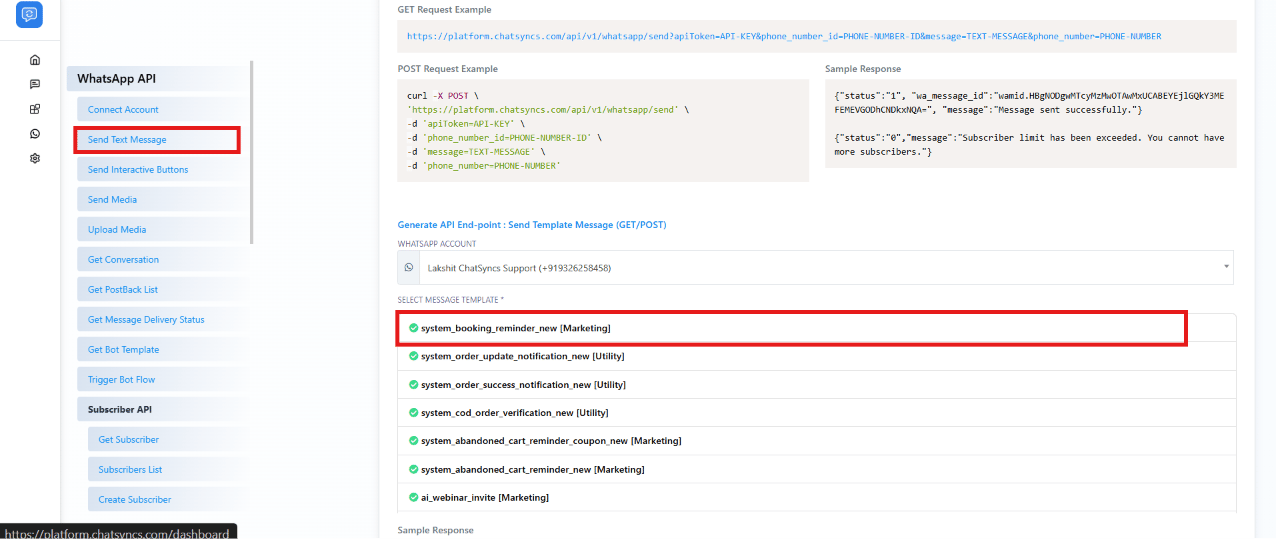
Go to the [**API Developer Console**](https://platform.chatsyncs.com/api/developer/console#api-whatsapp-send-block) and click **Send Text Message** in the sidebar. The template generator lives further down on this same page — it isn't under Chatbot Manager.
Scroll down to **Generate API End-point: Send Template Message**, choose the WhatsApp account to send from, then click the approved template you want to send.
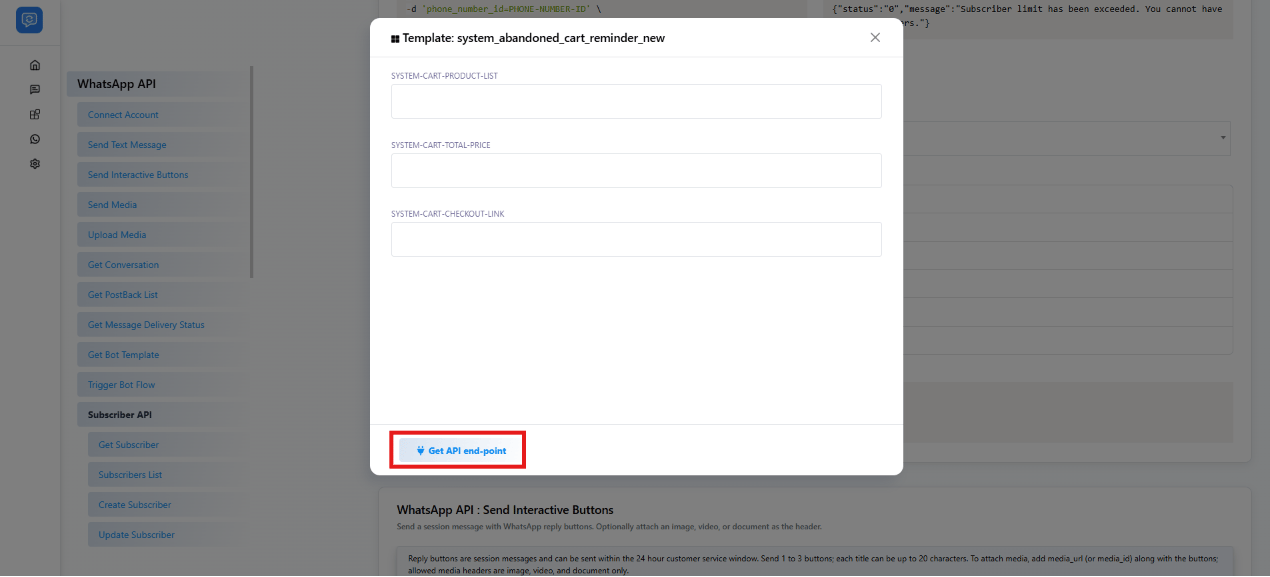
 A popup lists every variable the template needs — none of them come pre-filled. Type a real value into each one: a product list, a price, a checkout link, a button URL, whatever that specific template calls for.
 The console generates the exact GET URL and POST curl for that template — `apiToken`, `phone_number_id`, `template_id`, and every variable you just typed are already filled in. The only placeholder left in either request is `phone_number`.
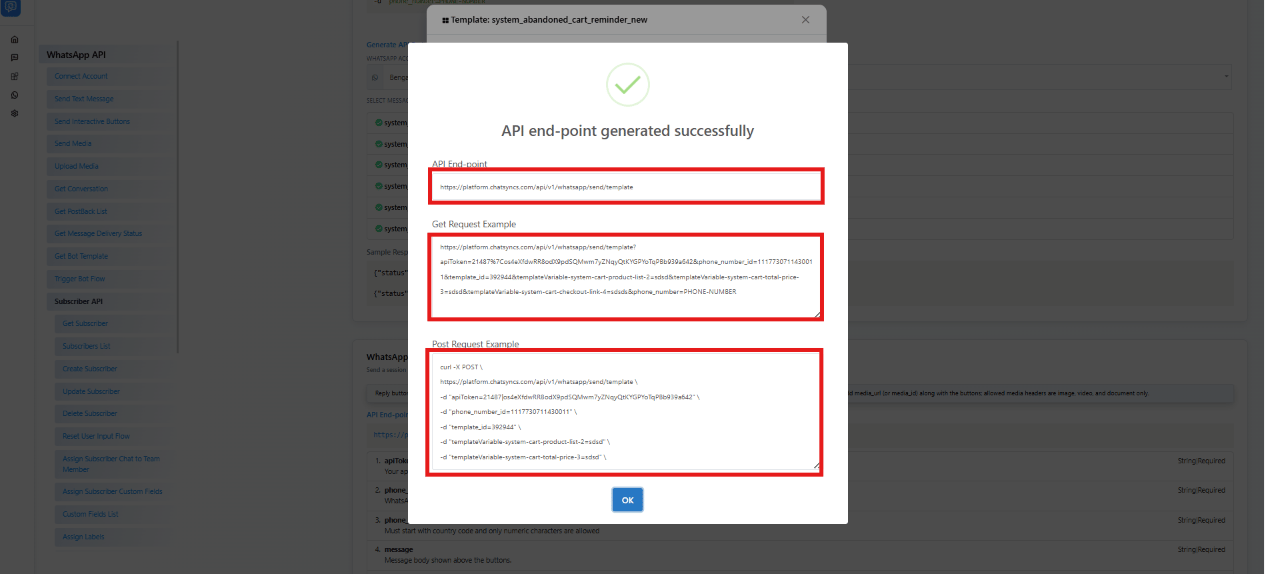 Copy the POST curl (or the GET URL) out of that popup — `apiToken`, `phone_number_id`, `template_id`, and every variable are already inside it, so there's nothing left to look up. Replace `phone_number` with the recipient's number (country code first, digits only, no `+`, e.g. `91XXXXXXXXXX` for an Indian number), then run it from a terminal or a tool like [Postman](https://www.postman.com/) or [Insomnia](https://insomnia.rest/).
## OpenAPI
````yaml POST /whatsapp/send/template
openapi: 3.1.0
info:
title: ChatSyncs Developer API
version: 1.0.0
description: >-
REST API for sending WhatsApp messages and managing subscribers through
ChatSyncs.
**Authentication.** Send your key as the `apiToken` parameter, or as
`Authorization: Bearer ` — both work on every endpoint **except Custom
Fields List**, which only accepts the `apiToken` parameter (a Bearer header
alone is answered with *The api token field is required.*). A wrong key
returns HTTP 401 `{"status":"0","message":"Unauthenticated."}`; no key at
all redirects to the login page.
**Methods.** Every endpoint accepts both GET and POST with the same
parameters, except Upload Media, which is POST-only. Use POST for anything
that changes data.
**Errors.** Failures usually come back as HTTP 200 with `"status":"0"` and
the reason in `message`, so always check `status`. `status` is the string
`"1"` or `"0"` on most endpoints and a boolean on a few.
**Lists.** Endpoints that return rows put them in `message` as a list; there
is no `data` field (Custom Fields List is the exception and uses `data`).
servers:
- url: https://platform.chatsyncs.com/api/v1
security: []
paths:
/whatsapp/send/template:
post:
tags:
- WhatsApp API
summary: Send Template Message
description: >-
Sends an approved WhatsApp message template to a phone number.
`template_id` is the **`id`** of the template from Bot Template Get (the
short ChatSyncs number, as in the dashboard's ID column) — Meta's long
`template_id` is answered with "Message template not found". The
contact's first name fills itself in. Every other body variable is sent
as a field named `templateVariable--` — for example
`templateVariable-system-cart-product-list-2` — where `` and
`` come from the template (see the page notes); a variable
sent with no value is delivered as `-`. **A URL button whose link ends
in a variable** (such as `https://example.com/{{1}}`) takes a value in
the same way, numbered **after** the body variables: for a template with
four body variables the first button variable is
`templateVariable-payment_link-5`. **A template with quick-reply
buttons** can take `template_quick_reply_button_values`, a JSON array
with the bot reply each button runs when tapped. It is optional: without
it the message is delivered but the buttons start no bot reply. Carousel
templates, templates with an image/video/document header, and templates
whose variables are not mapped cannot be sent through this endpoint;
ChatSyncs refuses them.
operationId: sendTemplateMessage
requestBody:
required: true
content:
application/x-www-form-urlencoded:
schema:
type: object
properties:
apiToken:
type: string
description: >-
Your ChatSyncs API key (not a WhatsApp/Meta access token).
[Where to find
it](/developer-api/finding-ids#api-token-apitoken).
example: API-KEY
phone_number_id:
type: string
description: >-
The WhatsApp account's phone number ID. [Where to find
it](/developer-api/finding-ids#phone-number-id-phone_number_id).
example: PHONE-NUMBER-ID
template_id:
type: string
description: >-
The template to send: its **`id`** from Bot Template Get
(the short ChatSyncs number). Not Meta's long `template_id`.
[Where to find
it](/developer-api/finding-ids#template-id-template_id).
example: '428445'
phone_number:
type: string
description: The recipient phone number, with country code, digits only.
example: PHONE-NUMBER
template_quick_reply_button_values:
type: string
description: >-
**Optional.** For a template with **quick-reply buttons**: a
JSON array with the bot reply each quick-reply button runs
when the contact taps it — one entry per quick-reply button,
in button order. Each entry is a **postback id** from [Get
Postback List](/developer-api/whatsapp/get-postback-list),
e.g. `["YES_START_CHAT_WITH_BOT"]`. Leave it out and the
message is still delivered, but tapping its quick-reply
buttons starts none of your bot replies. The API Developer
Console always asks you to pick one for every quick-reply
button.
example: '["YES_START_CHAT_WITH_BOT"]'
templateVariable-{name}-{position}:
type: string
description: >-
A value for one variable, repeated once per variable.
`{position}` is the placeholder number (2 for `{{2}}`) and
`{name}` is the variable's name, e.g.
`system-cart-total-price` or `productlist`. The variable at
the end of a URL button's link comes **after** the body
variables and continues the count: with four body variables
it is `templateVariable-payment_link-5`. Its value is added
to the end of the button's link, so it cannot contain
spaces. Not needed for the contact's first name. Single
line, no tabs, up to 1024 characters.
example: '999'
required:
- apiToken
- phone_number_id
- template_id
- phone_number
responses:
'200':
description: >-
Standard ChatSyncs response. status is "1" on success and "0" on
failure.
content:
application/json:
schema:
type: object
properties:
status:
type: string
description: '"1" = success, "0" = failure.'
message:
type: string
description: Human-readable result message.
examples:
success:
summary: Success
value:
status: '1'
wa_message_id: >-
wamid.HBgNODgwMTcyMzMwOTAwMxUCABEYEjlGQkY3MEFEMEVGODhCNDkxNQA=
message: Template message has been sent successfully.
error:
summary: Subscriber limit exceeded
value:
status: '0'
message: >-
Subscriber limit has been exceeded. You cannot have more
subscribers.
headerMismatch:
summary: Missing/wrong header format
value:
status: '0'
message: 'header: Format mismatch, expected IMAGE, received UNKNOWN'
carousel:
summary: A carousel template
value:
status: '0'
message: Card header missing (for card_index=0)
notFound:
summary: Wrong template_id (e.g. Meta's long id)
value:
status: '0'
message: Message template not found.
badButtonUrl:
summary: >-
A URL button's variable was left out or is not a valid link
part
value:
status: '0'
message: >-
buttons: URL parameter generates an invalid URL:
https://www.chatsyncs.com/…
'401':
description: >-
`apiToken` is wrong. (With no token at all the API redirects to the
login page with HTTP 302 instead of returning JSON.)
content:
application/json:
schema:
type: object
properties:
status:
type: string
message:
type: string
examples:
unauthenticated:
summary: Wrong apiToken
value:
status: '0'
message: Unauthenticated.
````
This documentation is built and hosted on [Mintlify](https://mintlify.com), a developer documentation platform.
Copy the POST curl (or the GET URL) out of that popup — `apiToken`, `phone_number_id`, `template_id`, and every variable are already inside it, so there's nothing left to look up. Replace `phone_number` with the recipient's number (country code first, digits only, no `+`, e.g. `91XXXXXXXXXX` for an Indian number), then run it from a terminal or a tool like [Postman](https://www.postman.com/) or [Insomnia](https://insomnia.rest/).
## OpenAPI
````yaml POST /whatsapp/send/template
openapi: 3.1.0
info:
title: ChatSyncs Developer API
version: 1.0.0
description: >-
REST API for sending WhatsApp messages and managing subscribers through
ChatSyncs.
**Authentication.** Send your key as the `apiToken` parameter, or as
`Authorization: Bearer ` — both work on every endpoint **except Custom
Fields List**, which only accepts the `apiToken` parameter (a Bearer header
alone is answered with *The api token field is required.*). A wrong key
returns HTTP 401 `{"status":"0","message":"Unauthenticated."}`; no key at
all redirects to the login page.
**Methods.** Every endpoint accepts both GET and POST with the same
parameters, except Upload Media, which is POST-only. Use POST for anything
that changes data.
**Errors.** Failures usually come back as HTTP 200 with `"status":"0"` and
the reason in `message`, so always check `status`. `status` is the string
`"1"` or `"0"` on most endpoints and a boolean on a few.
**Lists.** Endpoints that return rows put them in `message` as a list; there
is no `data` field (Custom Fields List is the exception and uses `data`).
servers:
- url: https://platform.chatsyncs.com/api/v1
security: []
paths:
/whatsapp/send/template:
post:
tags:
- WhatsApp API
summary: Send Template Message
description: >-
Sends an approved WhatsApp message template to a phone number.
`template_id` is the **`id`** of the template from Bot Template Get (the
short ChatSyncs number, as in the dashboard's ID column) — Meta's long
`template_id` is answered with "Message template not found". The
contact's first name fills itself in. Every other body variable is sent
as a field named `templateVariable--` — for example
`templateVariable-system-cart-product-list-2` — where `` and
`` come from the template (see the page notes); a variable
sent with no value is delivered as `-`. **A URL button whose link ends
in a variable** (such as `https://example.com/{{1}}`) takes a value in
the same way, numbered **after** the body variables: for a template with
four body variables the first button variable is
`templateVariable-payment_link-5`. **A template with quick-reply
buttons** can take `template_quick_reply_button_values`, a JSON array
with the bot reply each button runs when tapped. It is optional: without
it the message is delivered but the buttons start no bot reply. Carousel
templates, templates with an image/video/document header, and templates
whose variables are not mapped cannot be sent through this endpoint;
ChatSyncs refuses them.
operationId: sendTemplateMessage
requestBody:
required: true
content:
application/x-www-form-urlencoded:
schema:
type: object
properties:
apiToken:
type: string
description: >-
Your ChatSyncs API key (not a WhatsApp/Meta access token).
[Where to find
it](/developer-api/finding-ids#api-token-apitoken).
example: API-KEY
phone_number_id:
type: string
description: >-
The WhatsApp account's phone number ID. [Where to find
it](/developer-api/finding-ids#phone-number-id-phone_number_id).
example: PHONE-NUMBER-ID
template_id:
type: string
description: >-
The template to send: its **`id`** from Bot Template Get
(the short ChatSyncs number). Not Meta's long `template_id`.
[Where to find
it](/developer-api/finding-ids#template-id-template_id).
example: '428445'
phone_number:
type: string
description: The recipient phone number, with country code, digits only.
example: PHONE-NUMBER
template_quick_reply_button_values:
type: string
description: >-
**Optional.** For a template with **quick-reply buttons**: a
JSON array with the bot reply each quick-reply button runs
when the contact taps it — one entry per quick-reply button,
in button order. Each entry is a **postback id** from [Get
Postback List](/developer-api/whatsapp/get-postback-list),
e.g. `["YES_START_CHAT_WITH_BOT"]`. Leave it out and the
message is still delivered, but tapping its quick-reply
buttons starts none of your bot replies. The API Developer
Console always asks you to pick one for every quick-reply
button.
example: '["YES_START_CHAT_WITH_BOT"]'
templateVariable-{name}-{position}:
type: string
description: >-
A value for one variable, repeated once per variable.
`{position}` is the placeholder number (2 for `{{2}}`) and
`{name}` is the variable's name, e.g.
`system-cart-total-price` or `productlist`. The variable at
the end of a URL button's link comes **after** the body
variables and continues the count: with four body variables
it is `templateVariable-payment_link-5`. Its value is added
to the end of the button's link, so it cannot contain
spaces. Not needed for the contact's first name. Single
line, no tabs, up to 1024 characters.
example: '999'
required:
- apiToken
- phone_number_id
- template_id
- phone_number
responses:
'200':
description: >-
Standard ChatSyncs response. status is "1" on success and "0" on
failure.
content:
application/json:
schema:
type: object
properties:
status:
type: string
description: '"1" = success, "0" = failure.'
message:
type: string
description: Human-readable result message.
examples:
success:
summary: Success
value:
status: '1'
wa_message_id: >-
wamid.HBgNODgwMTcyMzMwOTAwMxUCABEYEjlGQkY3MEFEMEVGODhCNDkxNQA=
message: Template message has been sent successfully.
error:
summary: Subscriber limit exceeded
value:
status: '0'
message: >-
Subscriber limit has been exceeded. You cannot have more
subscribers.
headerMismatch:
summary: Missing/wrong header format
value:
status: '0'
message: 'header: Format mismatch, expected IMAGE, received UNKNOWN'
carousel:
summary: A carousel template
value:
status: '0'
message: Card header missing (for card_index=0)
notFound:
summary: Wrong template_id (e.g. Meta's long id)
value:
status: '0'
message: Message template not found.
badButtonUrl:
summary: >-
A URL button's variable was left out or is not a valid link
part
value:
status: '0'
message: >-
buttons: URL parameter generates an invalid URL:
https://www.chatsyncs.com/…
'401':
description: >-
`apiToken` is wrong. (With no token at all the API redirects to the
login page with HTTP 302 instead of returning JSON.)
content:
application/json:
schema:
type: object
properties:
status:
type: string
message:
type: string
examples:
unauthenticated:
summary: Wrong apiToken
value:
status: '0'
message: Unauthenticated.
````
This documentation is built and hosted on [Mintlify](https://mintlify.com), a developer documentation platform.